Hi @Hui_Liu
Honestly, looking at raw data without visual confirmation is extremely difficult to diagnose, as many different physical or software issues can manifest as similar-looking force spikes.
I’ve been investigating some performance and data quality issues in the simulation pipeline over the past few days, and I wanted to share some of my findings. I will finish with visual examples and sensor data to make it more concrete and try to get closer to your comment with my data.
Before start recording again, I’ve been doing a deep dive into my own dataset recordings lately, motivated by the poor performance of a π0.5 model I trained. Initially, I used mostly default values, assuming the standard 30Hz recording frequency was fine.
However, after updating to LeRobot 0.5.0 , I started seeing massive “Record loop is running slower” warnings:
WARNING cord_050.py:446 Record loop is running slower (1.2 Hz) than the target FPS (30 Hz).
WARNING cord_050.py:446 Record loop is running slower (4.5 Hz) than the target FPS (30 Hz).
This led me to investigate the source code and documentation, where I realized the simulated Basler cameras are actually capped at 20fps 
# From aic_robot.py
"center_camera": ROS2CameraConfig(name="center_camera", fps=20, width=1152, height=1024, ...)
Recording at 30Hz when the source is 20Hz is a recipe for disaster. I even tried a “middle ground” at 15Hz , but LeRobot threw assertion errors for about 70% of my frames because the timestamps didn’t align with the video.
Conclusion: recording frequency must be a divisor of the camera’s native 20Hz (e.g., 20, 10, 5, or 4 Hz ).
Even so, reaching a stable 20Hz is tough. Checking the ROS topic frequency reveals a significant drop over time:
$ pixi run ros2 topic hz /left_camera/image
average rate: 19.380
        min: 0.041s max: 0.056s std dev: 0.00315s window: 19
...
average rate: 14.013
	min: 0.033s max: 0.216s std dev: 0.03566s window: 1573
I’ve settled on 10Hz as a compromise for precision tasks like insertion. 4Hz or 5Hz feels too low for the “last centimeter” reactivity required here.
The “Cold Start” Problem
I also noticed that the worst lag spikes happen at the very beginning of the recording. As you can see in my logs below, the Obs (observation) time can spike to 798ms (nearly 1 second!) for a single frame:
[INFO] [1775219197.456747804] [aic_cheatcode_bridge_teleop]: ▶️  Starting trial: trial_004
WARNING 2026-04-03 14:26:37 cord_050.py:446 Record loop is running slower (5.7 Hz) than the target FPS (10 Hz).
Dataset frames might be dropped and robot control might be unstable. Common causes are: 1) Camera FPS not keeping up 2) Policy inference taking too long 3) CPU starvation
INFO 2026-04-03 14:26:37 cord_050.py:455 TIMING - Obs: 55.3ms, Proc: 0.0ms, Frame: 0.0ms, Teleop: 63.2ms, Dataset: 55.7ms
INFO 2026-04-03 14:26:37 cord_050.py:455 TIMING - Obs: 35.5ms, Proc: 0.0ms, Frame: 0.0ms, Teleop: 0.3ms, Dataset: 5.6ms
WARNING 2026-04-03 14:26:38 cord_050.py:446 Record loop is running slower (1.2 Hz) than the target FPS (10 Hz).
Dataset frames might be dropped and robot control might be unstable. Common causes are: 1) Camera FPS not keeping up 2) Policy inference taking too long 3) CPU starvation
INFO 2026-04-03 14:26:38 cord_050.py:455 TIMING - Obs: 798.3ms, Proc: 0.0ms, Frame: 0.0ms, Teleop: 0.3ms, Dataset: 53.6ms
WARNING 2026-04-03 14:26:38 cord_050.py:446 Record loop is running slower (4.5 Hz) than the target FPS (10 Hz).
Dataset frames might be dropped and robot control might be unstable. Common causes are: 1) Camera FPS not keeping up 2) Policy inference taking too long 3) CPU starvation
INFO 2026-04-03 14:26:38 cord_050.py:455 TIMING - Obs: 164.2ms, Proc: 0.0ms, Frame: 0.0ms, Teleop: 0.5ms, Dataset: 55.7ms
I suspect this is due to the massive bandwidth of 3x 1152x1024 images (1.2MB each) saturating the Zenoh bridge, or perhaps the overhead of initializing the NVENC GPU encoder session. After a few seconds, it stabilizes, and the warnings disappear. Has anyone found a way to mitigate this initial “warm-up” lag?
RTF and Force Spikes
Another critical factor is the Real Time Factor (RTF) . In my tests, RTF starts at ~95% but drops to 30-40% during the actual insertion phase. This effectively puts the physics in “slow motion” while the recorder keeps ticking, which I fear might corrupt the learning of robot dynamics.

You can see how RTF starts with 98.39% and in minute (1:00) you have 24.93%.
Regarding the force peaks , I am seeing them too. In video recording, I hit a 44N peak in Force Z . By using a custom visualizer to sync the dataset with the frames, I thinkg the culprit is The Cable.
- left camera

- right camera

- center camera

- Gazebo
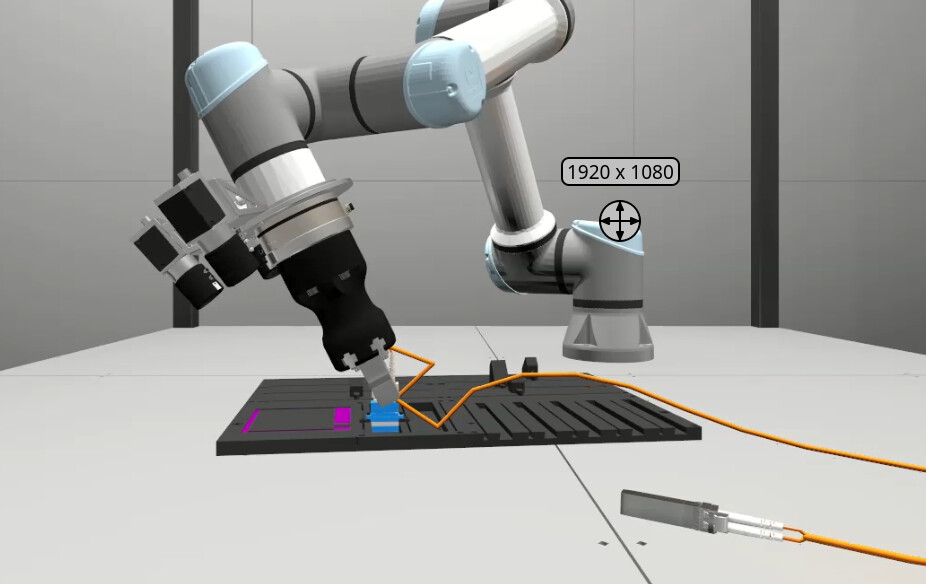
As you can see in the global view at Frame 464 , the cable gets severely kinked into an “N” shape against the board. This creates massive mechanical tension that forces the connector out of alignment, causing it to hit the rim of the port. Even though the “CheatCode” policy is sending the correct coordinates, the physics of the cable is fighting back.
Some questions that come to my mind:
- What is the community’s “sweet spot” FPS for this task?
- Has anyone else seen these massive
get_observationspikes specifically at the start of recordings? - How do you handle the trade-off between raw resolution (1152x1024) and maintaining a stable 20Hz / RTF 1.0?
Regards!